JavaScript Event Loop Explained | A Complete Guide with Call Stack, Web APIs, Callback Queue & Microtasks
Master the JavaScript Event Loop with easy-to-understand examples. Learn about the Call Stack, Web APIs, Callback Queue, Microtask Queue, Promises, async/await, and interview questions.

Muhammad Ali
Full Stack Developer
JavaScript Event Loop Explained: A Complete Guide
If you've ever asked yourself:
- Why does
setTimeout()execute after synchronous code? - Why do Promises run before
setTimeout()? - How does JavaScript perform asynchronous tasks if it's single-threaded?
The answer is the JavaScript Event Loop.
Understanding the Event Loop is essential for writing efficient JavaScript applications and succeeding in frontend or Node.js interviews.
In this guide, we'll break it down step by step with examples.
Is JavaScript Single-Threaded?
Yes.
JavaScript has one Call Stack, meaning it can execute only one task at a time.
Example:
console.log("A");
console.log("B");
console.log("C");
Output
A
B
C
Each statement waits for the previous one to finish.
The Problem
Imagine this code:
console.log("Start");

setTimeout(() => {
  console.log("Timer");
}, 2000);

console.log("End");
Output
Start
End
Timer
Question:
If JavaScript is single-threaded, how did it continue executing without waiting 2 seconds?
The answer lies in the Event Loop.
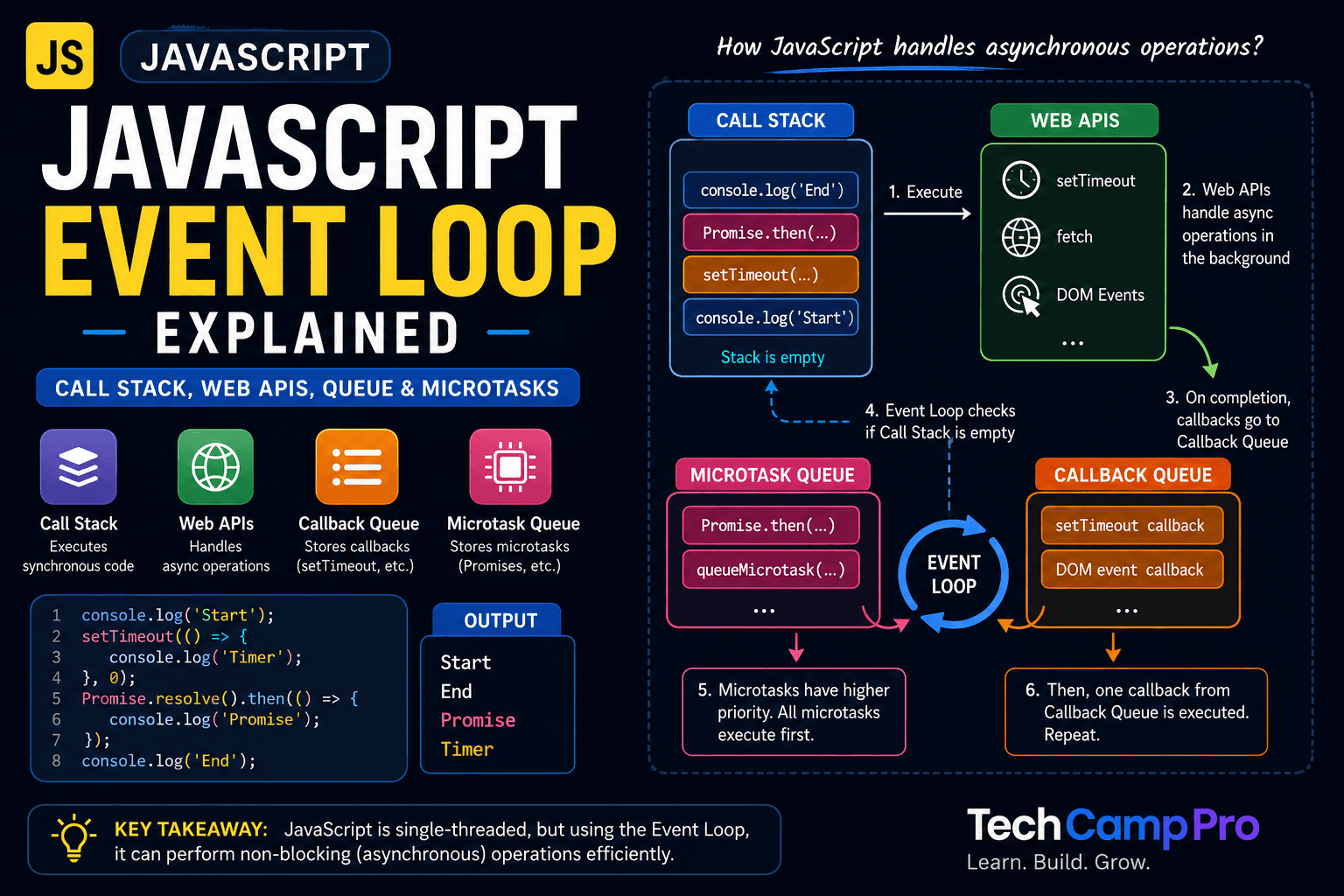
The Components of the Event Loop
The Event Loop works with several important components:
- Call Stack
- Web APIs
- Callback Queue
- Microtask Queue
- Event Loop
Think of them as a team working together.
1. Call Stack
The Call Stack keeps track of which function is currently executing.
Example:
function one() {
  two();
}

function two() {
  console.log("Hello");
}

one();
Execution:
Call Stack

one()

↓

two()

↓

console.log()

↓

Stack Empty
Functions are pushed onto the stack and popped off after execution.
2. Web APIs
Functions like:
- setTimeout
- fetch
- DOM Events
- GeoLocation
are not part of the JavaScript language itself. They are provided by the runtime environment (such as the browser or Node.js).
Many developers mistakenly believe these APIs are part of JavaScript, but they are not. JavaScript simply provides the syntax to interact with them, while the runtime is responsible for implementing and executing them.
The browser provides them through Web APIs.
Example:
setTimeout(() => {
  console.log("Done");
}, 3000);
The timer is managed by the browser, not by the Call Stack.
3. Callback Queue
Once the timer completes, its callback moves to the Callback Queue.
It does not execute immediately.
It waits until the Call Stack becomes empty.
4. Microtask Queue
Promises don't go into the Callback Queue.
They go into the Microtask Queue, which has higher priority.
Example:
Promise.resolve().then(() => {
  console.log("Promise");
});
Execution Example
console.log("Start");

setTimeout(() => {
  console.log("Timer");
}, 0);

Promise.resolve().then(() => {
  console.log("Promise");
});

console.log("End");
Output
Start
End
Promise
Timer
Why Does Promise Execute First?
Execution flow:
Call Stack

    ↓

console.log("Start")

    ↓

setTimeout()
    ↓

Browser Web API

    ↓

Promise.then()

    ↓

Microtask Queue

    ↓

console.log("End")

    ↓

Call Stack Empty

    ↓

Run ALL Microtasks

    ↓

Run Callback Queue
Since the Microtask Queue has higher priority, Promise callbacks execute before timer callbacks.
Visual Flow
          JavaScript Engine

              │

        ┌─────────────┐
        │ Call Stack  │
        └──────┬──────┘
               │
       Stack Empty?
               │
        Yes ───┘
               │
      Event Loop Checks
               │
      ┌────────┴────────┐
      │                 │
Microtask Queue   Callback Queue
(Promise)         (setTimeout)
      │                 │
      ▼                 ▼
Execute First      Execute Later
Async/Await
Many developers think await blocks JavaScript.
It doesn't.
Example:
async function test() {
  console.log("A");

  await Promise.resolve();

  console.log("B");
}

test();

console.log("C");
Output
A
C
B
Because await also schedules the remaining code as a Microtask.
and await line of code return a Promise value.
Common Interview Question
Predict the output:
console.log(1);

setTimeout(() => {
  console.log(2);
}, 0);

Promise.resolve().then(() => {
  console.log(3);
});

console.log(4);
Answer
1
4
3
2
Real-World Use Cases
Understanding the Event Loop helps when working with:
- API requests
- React state updates
- Node.js
- Async/Await
- Promises
- Animations
- Timers
- WebSockets
Common Mistakes
❌ Thinking setTimeout(fn, 0) runs immediately.
❌ Thinking Promises are synchronous.
❌ Forgetting that Microtasks always execute before the Callback Queue.
❌ Believing JavaScript has multiple threads.
Interview Tips
If someone asks:
Explain the JavaScript Event Loop.
A good answer is:
JavaScript is single-threaded and executes synchronous code using the Call Stack. Asynchronous operations are handled by browser Web APIs. Completed callbacks move to either the Microtask Queue (Promises) or Callback Queue (Timers). The Event Loop continuously checks whether the Call Stack is empty or no. It executes all Microtasks first, followed by Callback Queue tasks.
Key Takeaways
- JavaScript is single-threaded.
- The Call Stack executes synchronous code.
- Web APIs handle asynchronous operations.
- Promises use the Microtask Queue.
- Timers use the Callback Queue.
- The Event Loop runs Microtasks before Callback Queue tasks.
Conclusion
The JavaScript Event Loop is one of the most important concepts every developer should understand. Once you know how the Call Stack, Web APIs, Microtask Queue, and Callback Queue work together, asynchronous JavaScript becomes much easier to reason about.
Mastering this concept will improve your debugging skills, help you write better asynchronous code, and prepare you for JavaScript interviews.
Frequently Asked Questions
JavaScript Event Loop
The event loop is responsible for handling asynchronous operations by continuously checking the call stack and the message queue.
Get new posts in your inbox
Occasional notes on code, craft, and things I break along the way. No spam — unsubscribe anytime.
Written by
Muhammad Ali
Full Stack Developer